


NOAA Weather Unofficial (Pro)
4.88.08K Reviews
App Specs
- Version
- 2.18.1
- Updated On
- License
- $1.99
- Downloads
- 100,000+
- Developer
- Granite Apps
- Categories
- Weather
- Platform
- Android
Screenshots
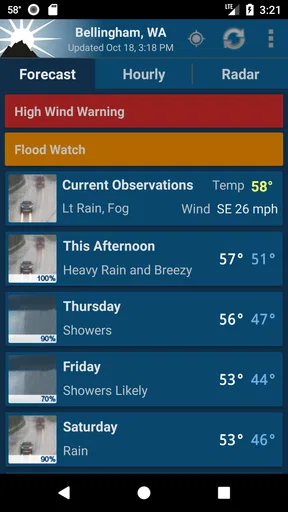
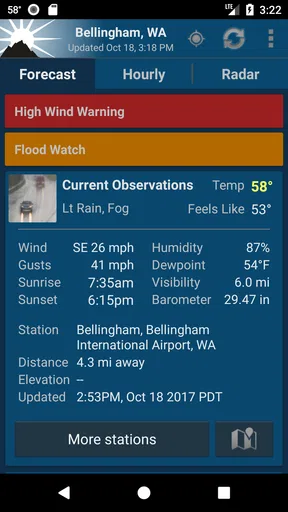
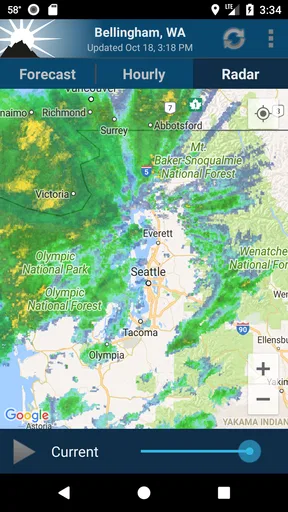
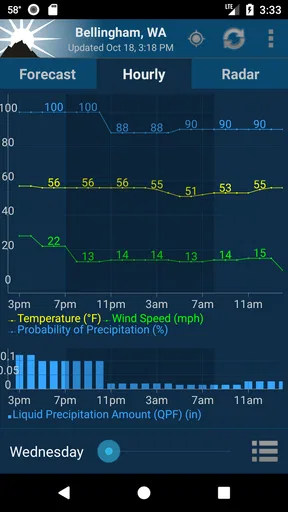
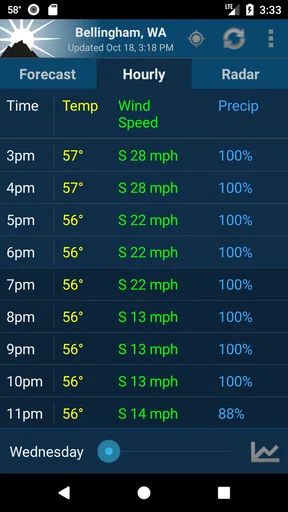
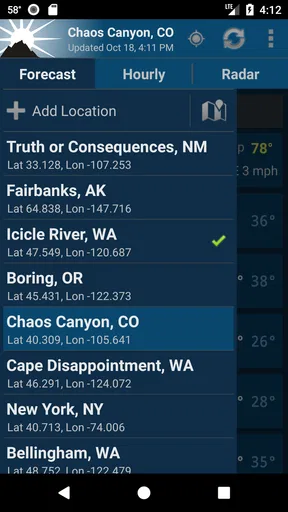
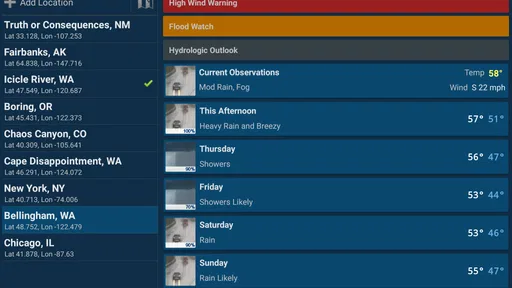
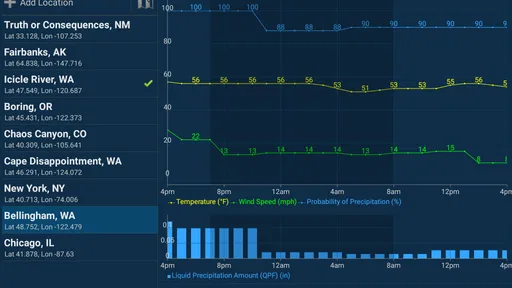
 Analysis by AppCompare
I tend to judge weather apps by what happens after the first few days: do I still open them because they help me make decisions, or do they become another icon I ignore? NOAA Weather Unofficial (Pro) has a clear purpose: it brings NOAA forecasts and radar into a focused weather app. That makes it appealing if you want a practical check before leaving home, but its lasting value depends on whether NOAA-based information fits the way you plan your day.
Useful from the first check
The first-week appeal is easy to understand. When rain is on the horizon, a forecast gives you the basic answer, while radar helps you look at what is moving nearby. I find that pairing more useful than opening a general-purpose weather app, glancing at a single icon, and still wondering whether a shower is likely to affect my route.
A realistic routine is to check the radar before walking to a bus stop, then look again before deciding whether to carry a raincoat for the trip home. The map is most valuable as a decision aid, not as a promise that you can predict the exact moment rain will reach your street. I would treat it as one piece of context and leave a little margin when the weather matters.
Where the routine earns its place
After the novelty of moving radar fades, the app has to justify a spot on the phone through repeat use. Its strongest case is for people who regularly make weather-dependent choices: commuters deciding what to wear, walkers choosing when to head out, or anyone who wants to check conditions before spending time outdoors. A quick, consistent visit can be more useful than a long list of features you rarely touch.
NOAA Weather Unofficial (Pro) is made by Granite Apps and is a paid weather app, listed at $1.99. I’d think of that cost as a choice between a focused NOAA-oriented tool and whatever weather service I already use, rather than assuming that a paid app automatically gives a better forecast. Its 4.8 average from around 18,000 ratings suggests many users are satisfied, but the right test is whether its presentation and information suit your own location and habits.
It has been around since February 22, 2012, and the current version is 2.16.2. That long presence can be reassuring if you prefer an established utility over a brand-new weather app, though it does not remove the need to decide whether the interface works for you today. The app is rated for Everyone, has over 100,000 installs, and runs on Android 4.4 or later.
Making radar and alerts work for you
One useful habit is to check radar when the forecast and the sky seem to disagree. A forecast summarizes expected conditions; the map gives you a visual sense of nearby movement. Neither view should be treated as certainty, especially when you are making a time-sensitive outdoor plan, but comparing them can help you decide whether to leave now, wait, or bring a backup layer.
Worth Reading Before You Choose

EA SPORTS FC Mobile 26 Is a Bigger Football Game, but It Takes Time

Flipboard Shows What News Apps Must Do Beyond the Feed

Switching to Android Auto Means Rethinking Your Driving Routine

Google Calendar Makes a Crowded Week Easier to Manage

Ludo King Makes the Most of the Minutes Between Plans

Baby Panda World Brings Quick Play to Modern Phones, but Its Game Library Feels Busy
Alerts are best approached selectively. I would enable the notices that could change what I do, rather than turning on every possible prompt and training myself to dismiss them. A severe-weather alert is worth attention; a phone that buzzes too often can make even important warnings easier to overlook. It also makes sense to check that notifications are allowed on the device if you rely on them, since an app cannot be a useful warning system when its notices are blocked.
How it compares with everyday weather apps
Many built-in or general weather apps are designed to give a quick overview with little effort. That can be the better choice when all you want is the temperature and a simple rain icon. This app makes more sense when you specifically want NOAA-centered forecasts and radar in one place, and are willing to open a map rather than rely only on a compact summary.
The trade-off is focus. People who want a broad lifestyle dashboard, lots of visual decoration, or an all-in-one package may prefer another weather service. Likewise, if you mostly check the weather once a week, installing a separate paid app may add little to your routine. I’d skip it if your current app already answers your practical questions clearly and you rarely need to inspect radar.
A tool that has to survive the first week
The app’s lasting value is less about novelty than maintenance: keep the location relevant, choose useful alert settings, and check the map when it can change a decision. If you travel between places, confirm that the displayed location matches where you actually need the forecast before relying on it. That small check prevents a familiar but unhelpful mistake: planning for home while standing somewhere with different conditions.
Small trade-offs that matter over time
Radar can invite overchecking. Watching a map repeatedly may feel informative without changing your plan, so I’d give myself a practical question before opening it: am I deciding when to leave, what to carry, or whether to postpone an activity? If the answer is no, a quick forecast glance may be enough. This keeps the app useful instead of turning weather into a constant distraction.
There is also a difference between an app being easy to navigate and it being the right source for every situation. For everyday plans, a local forecast and radar view can be a sensible combination. For a high-stakes outdoor decision, I would not let a single phone screen replace checking the relevant official warnings and using judgment about changing conditions. The useful takeaway is not to distrust the app, but to match the importance of the decision to the care you take.
Who should keep it installed
I can see this fitting people who live by outdoor routines and like to inspect weather visually: regular walkers, commuters who dislike being caught in rain, and users who want a NOAA-focused option rather than a generic forecast tile. It is also a reasonable choice for someone who enjoys learning how conditions evolve, provided that checking the radar remains a tool for planning rather than an idle habit.
It is less compelling for someone who wants a glanceable forecast and nothing more, or who prefers a polished lifestyle view with extras unrelated to radar and NOAA information. The Android minimum of 4.4 makes it usable on older supported devices, but the age of a phone alone does not guarantee a smooth experience; what matters to me is whether the app opens reliably and displays the information I need on that particular device.
What I would check before depending on it
Before making it part of a daily routine, I would confirm that the location shown is the one I care about and that the units and language are comfortable to read. If a particular NOAA weather station is available in the settings, selecting the one that makes sense for your area can help tailor the information you see. I would also test the alert setup during ordinary use, rather than waiting for a warning to discover that a device setting is suppressing notifications.
Those checks answer the practical questions most people have: can I make the display suit me, can I rely on alerts to reach the phone, and is the information useful for my location? The app offers settings for units, language, and station choice, so there is room to make it more personal than a fixed one-screen forecast. Still, customization is only worthwhile when it reduces friction; if the defaults already work, there is no need to spend time tuning every option.
My lasting impression
Hey there! So, I’ve been checking out this app called NOAA Weather Unofficial (Pro), and let me tell you, it’s a bit of a game-changer for weather enthusiasts or anyone who just wants to know if they need an umbrella before heading out. Let’s dive into the nitty-gritty of what this app has to offer and why it might just become your new favorite weather sidekick.
First Impressions
When you first open it, you’re greeted with a clean and intuitive interface. It’s not cluttered with unnecessary bells and whistles, which I find refreshing. Everything is laid out in a way that makes sense, and it’s super easy to navigate. If you’ve been using weather apps that feel like they’re trying to do too much, this one will be a breath of fresh air.
Features That Stand Out
One of the standout features of this app is its access to real-time weather data straight from NOAA. That’s the National Oceanic and Atmospheric Administration, for those who aren’t familiar, and it’s a pretty big deal in the weather world. You’re getting data that’s reliable and constantly updated, which is exactly what you want from a weather app.
Now, let’s talk about the radar. If you’re a visual person like me, you’ll love the radar feature. It’s detailed and gives you a comprehensive look at weather patterns in your area. You can zoom in and out, and it’s incredibly responsive. There’s something almost hypnotic about watching those weather systems move across the map.
Another cool feature is the weather alerts. You can customize these to notify you about severe weather conditions, which is perfect for those days when you’re not glued to your phone. It’s like having a mini meteorologist in your pocket.
Usability and Performance
Performance-wise, this app is a champ. It’s smooth, quick to load, and I haven’t encountered any bugs or crashes, which is more than I can say for some other weather apps I’ve tried. The developers clearly put a lot of effort into ensuring the app runs seamlessly.
The settings allow for a decent amount of customization, too. You can tweak the units of measurement, choose your preferred language, and even pick which NOAA weather station you want to pull data from. It’s all about making the app work for you, which I appreciate.
The Bottom Line
So, is it worth the download? In my opinion, absolutely. It’s reliable, user-friendly, and packed with features that make it stand out in the crowded world of weather apps. Whether you’re planning a weekend hike, trying to avoid getting drenched on your morning commute, or just a weather geek like me, this app has got you covered.
In a world where the weather can be as unpredictable as my cat’s moods, having a trusty app like this is invaluable. Give it a go, and you might just find yourself checking the weather a little more often, just for the fun of it.
Pros
- Accurate weather data from trusted sources.
- Customizable alerts for severe weather.
- No ads for a distraction-free experience.
- Detailed radar maps with high resolution.
- User-friendly interface with easy navigation.
Cons
- No free version available for testing.
- Limited widget customization options.
- Occasional slow updates on radar images.
- Requires internet connection for full features.
- Lack of integration with smart home devices.
FAQs for NOAA Weather Unofficial (Pro)
What features does NOAA Weather Unofficial (Pro) offer?
NOAA Weather Unofficial (Pro) provides users with detailed weather forecasts, including current conditions, hourly updates, and extended forecast information. It also offers radar images, severe weather alerts, and customizable widgets. The app pulls data directly from NOAA to ensure accuracy. Users can personalize notifications and access weather maps for a comprehensive view.
Is NOAA Weather Unofficial (Pro) available for both Android and iOS?
Yes, NOAA Weather Unofficial (Pro) is available for both Android and iOS platforms. Users can download the app from the Google Play Store or the Apple App Store. It is designed to work seamlessly across devices, ensuring that all features are accessible regardless of the operating system.
Does NOAA Weather Unofficial (Pro) require an internet connection?
Yes, an internet connection is necessary for NOAA Weather Unofficial (Pro) to fetch the latest weather data and updates. While some information may be cached for offline viewing, real-time updates, radar images, and alerts require connectivity to ensure users receive the most accurate and timely information.
Are there any in-app purchases or subscriptions in NOAA Weather Unofficial (Pro)?
NOAA Weather Unofficial (Pro) is a paid app that typically does not include in-app purchases or subscriptions. By purchasing the app, users gain access to all its features without the need for additional payments. This model ensures a straightforward user experience without recurring costs or ad interruptions.
How accurate is the weather data provided by NOAA Weather Unofficial (Pro)?
The app sources its data directly from the National Oceanic and Atmospheric Administration (NOAA), known for its precision and reliability in weather forecasting. Users can trust that the information provided—ranging from current conditions to severe weather alerts—is based on the latest data, making it highly accurate and dependable for planning and safety purposes.


